Critical Update Advisory Before Upgrading:
- Firmware updates should only be performed if you are experiencing specific issues with your device
- Car infotainment systems are not designed for frequent updates like mobile phones
- Unnecessary updates may lead to system instability, performance issues, or compatibility problems with your vehicle
- Always back up your settings before proceeding with any firmware update
- If your head unit is functioning correctly, we strongly advise against updating the firmware.
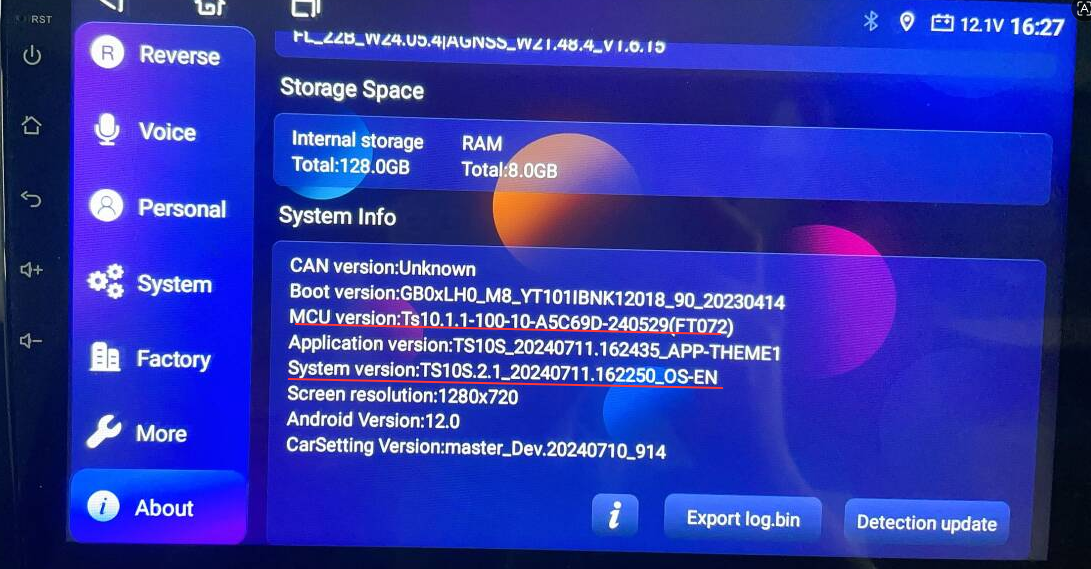
How to Verify Firmware Compatibility1. Open your car radio and go to Settings > About Device
2. Check your "System Version" and "MCU Version"
3. Ensure the firmware file you downloaded matches the key parameters of your current version
Example: If your T72 system version is `TS10S.2.1_20240711.162250_OS-EN`, your firmware file must start with `TS10S.2.X_202XXXXX.XXXXXX.OS-SN`. The same matching rule applies to MCU versions.
System Updates Firmware for T72 Android 10 Model: Download the Link Updates Method
System Updates Firmware for T72 Android 12 Model: Download the Link Updates Method
System Updates Firmware for T68B Android 10 Model: Download the Link Updates Method
System Updates Firmware for Q6 Android 13 Model: Download the Link Updates Method
System Updates Firmware for NA18 - T75 Android 14 Model: Download the Link Updates Method
System Updates Firmware for NA35 - T75 Android 14 Model: Download the Link Updates Method
MCU Updates Firmware for T72 Android 10 Model: Download the Link Updates Method
MCU Updates Firmware for T72 Android 12 Model: Download the Link Updates Method
MCU Updates Firmware for T68B Android 10 Model: Download the Link Updates Method
MCU Updates Firmware for Q6 Android 13 Model: Download the Link Updates Method
MCU Updates Firmware for NA18 - T75 Android 14 Model: Download the Link Updates Method
MCU Updates Firemware for NA35 - T75 Andriod 14 Model: Download the Link Updates Method